OpenClaw 接入微信
OpenClaw(原 Clawdbot)是一个开源、本地优先的 AI 代理网关,能让大模型在你的电脑/服务器上 7X24 小时运行,支持直接操作电脑、浏览网页、执行命令,还能无缝接入飞书、Telegram、Discord 等聊天平台。
本章节我们将 OpenClaw 接入飞书,实现消息推送、发图、收文件,审批交互、数据同步等自动化场景。
如果你还没安装 OpenClaw,需要先安装:
使用 npm 命令全局安装:
npm install -g openclaw@latest --registry=https://registry.npmmirror.com
或使用 pnpm 命令安装:
pnpm add -g openclaw@latest
个人微信一键接入(ClawBot 插件,iOS 8.0.70+)
前置条件
- 微信版本:iOS 8.0.70 及以上
- 已部署并运行 OpenClaw 实例(本地/服务器均可)
操作步骤
打开微信 → 我 → 设置 → 插件。
找到「ClawBot」卡片,点击进入, 可以看到安装的命令提示。
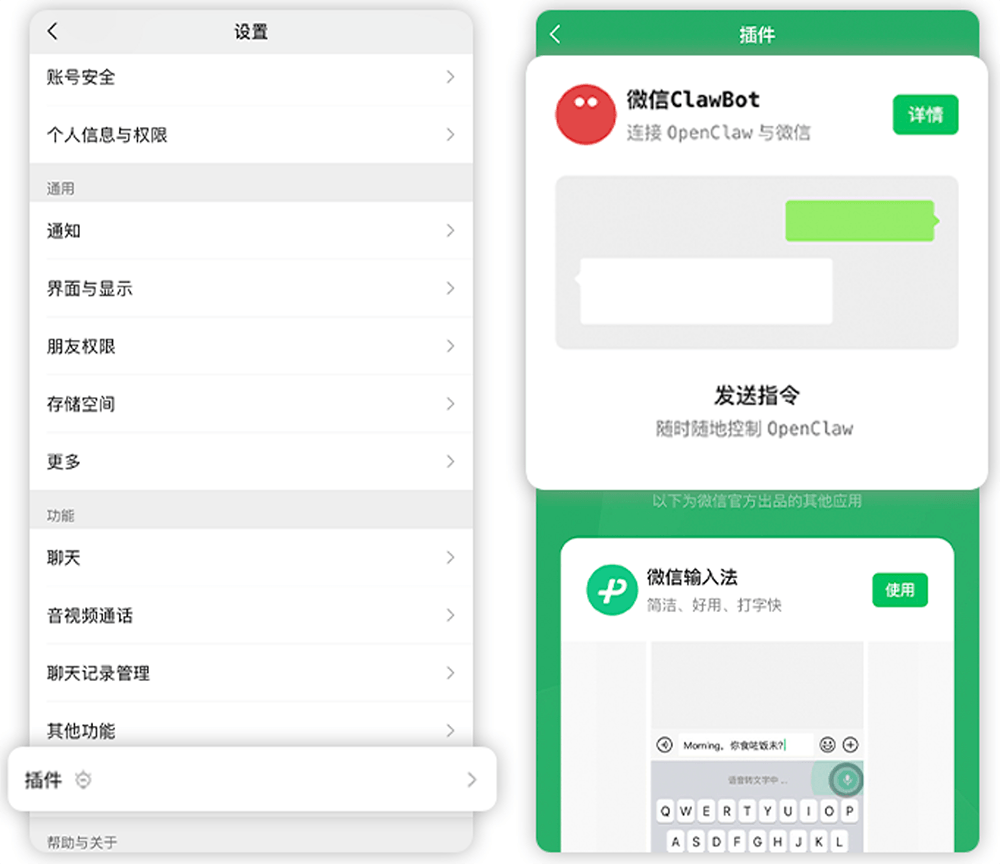
复制终端安装命令(也可以直接执行这一步):
npx -y @tencent-weixin/openclaw-weixin-cli@latest install
在 OpenClaw 所在设备的终端执行该命令:

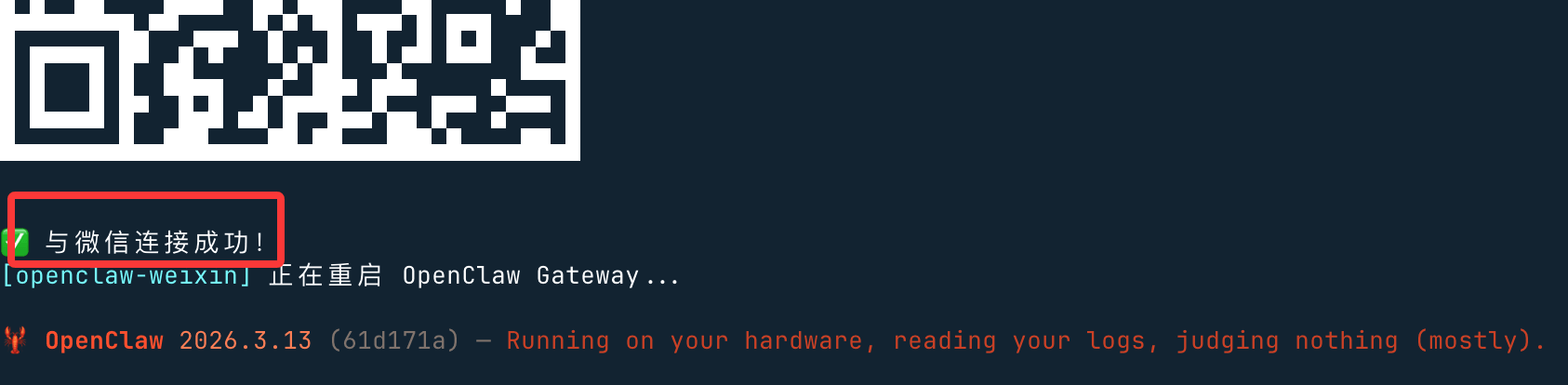
命令执行后会生成二维码,用微信扫码绑定:

扫码成功后会显示连接成功,并重启:
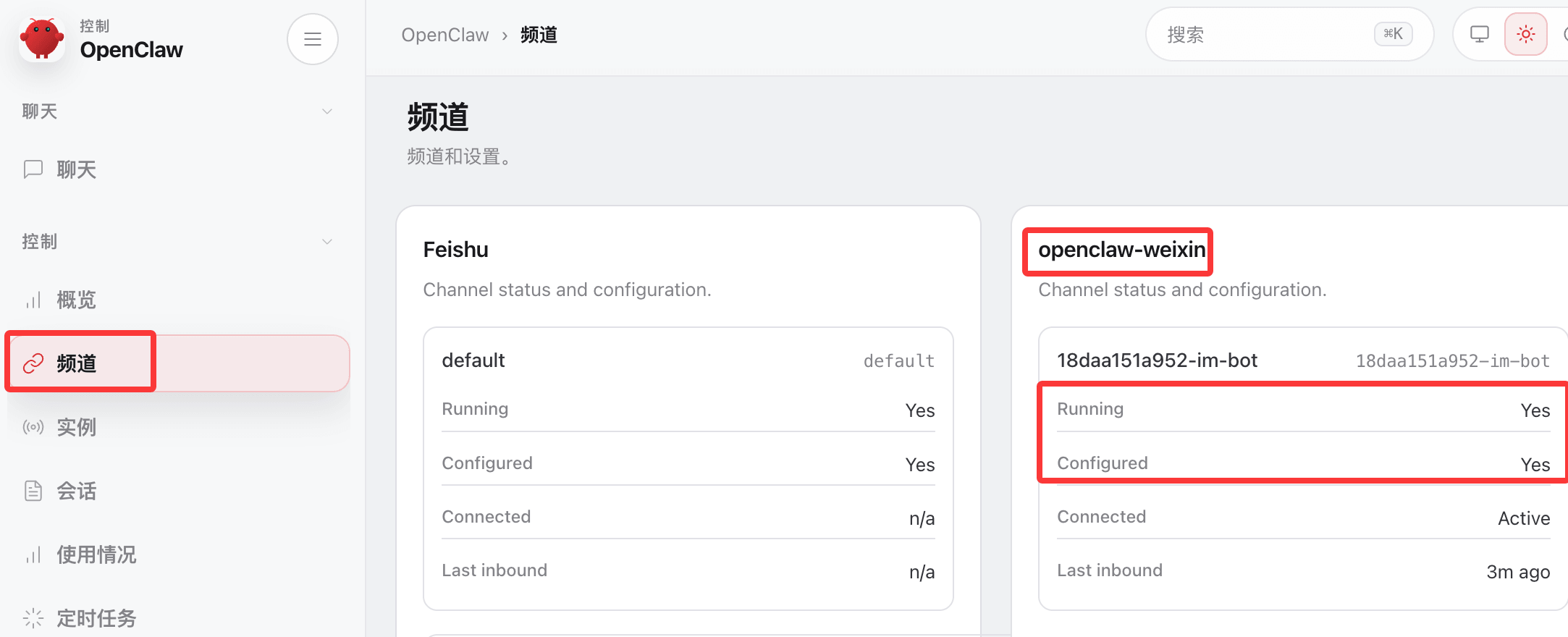
访问 OpenClaw 的后台,查看频道,看到微信已经部署好了:
绑定成功后,即可在微信聊天窗口直接与 OpenClaw 对话:
Windows 用户的问题
Windows 用户如果使用 npx,有可能会报错:未找到 openclaw。原因是 npx 使用 Linux 的 which 命令检测 openclaw,Windows 没有 which,所以会报"未找到 openclaw"

解决办法是,我们可以使用 openclaw 的插件命令安装:
openclaw plugins install "@tencent-weixin/openclaw-weixin"
启用插件:
openclaw config set plugins.entries.openclaw-weixin.enabled true
二维码登录:
openclaw channels login --channel openclaw-weixin
终端会出现一个二维码,用手机微信扫码并确认授权。
如果插件还安装不成功,可以使用网友 @百里凌涵 提供的脚本 cli.mjs,并与 package.json 与 LICENSE 文件放在同一目录,代码如下,然后执行该脚本即可继续安装。
node ./cli.mjs install
cli.mjs 文件内容:
#!/usr/bin/env node
import { execSync, spawnSync } from "node:child_process";
const PLUGIN_SPEC = "@tencent-weixin/openclaw-weixin";
const CHANNEL_ID = "openclaw-weixin";
// ── helpers ──────────────────────────────────────────────────────────────────
function log(msg) {
console.log(`\x1b[36m[openclaw-weixin]\x1b[0m ${msg}`);
}
function error(msg) {
console.error(`\x1b[31m[openclaw-weixin]\x1b[0m ${msg}`);
}
function run(cmd, { silent = true } = {}) {
const stdio = silent ? ["pipe", "pipe", "pipe"] : "inherit";
const result = spawnSync(cmd, { shell: true, stdio });
if (result.status !== 0) {
const err = new Error(`Command failed with exit code ${result.status}: ${cmd}`);
err.stderr = silent ? (result.stderr || "").toString() : "";
throw err;
}
return silent ? (result.stdout || "").toString().trim() : "";
}
function which(bin) {
try {
return execSync(`which ${bin}`, { encoding: "utf-8", stdio: ["pipe", "pipe", "pipe"] }).trim();
} catch {
return null;
}
}
// ── commands ─────────────────────────────────────────────────────────────────
function install() {
// 1. Check openclaw is installed
//if (!which("openclaw")) {
// error("未找到 openclaw,请先安装:");
// console.log(" npm install -g openclaw");
// console.log(" 详见 https://docs.openclaw.ai/install");
// process.exit(1);
//}
log("已找到本地安装的 openclaw");
// 2. Install plugin via openclaw
log("正在安装插件...");
try {
const installOut = run(`openclaw plugins install "${PLUGIN_SPEC}"`);
if (installOut) log(installOut);
} catch (installErr) {
if (installErr.stderr && installErr.stderr.includes("already exists")) {
log("检测到本地已安装,正在更新...");
try {
const updateOut = run(`openclaw plugins update "${CHANNEL_ID}"`);
if (updateOut) log(updateOut);
} catch (updateErr)
import { execSync, spawnSync } from "node:child_process";
const PLUGIN_SPEC = "@tencent-weixin/openclaw-weixin";
const CHANNEL_ID = "openclaw-weixin";
// ── helpers ──────────────────────────────────────────────────────────────────
function log(msg) {
console.log(`\x1b[36m[openclaw-weixin]\x1b[0m ${msg}`);
}
function error(msg) {
console.error(`\x1b[31m[openclaw-weixin]\x1b[0m ${msg}`);
}
function run(cmd, { silent = true } = {}) {
const stdio = silent ? ["pipe", "pipe", "pipe"] : "inherit";
const result = spawnSync(cmd, { shell: true, stdio });
if (result.status !== 0) {
const err = new Error(`Command failed with exit code ${result.status}: ${cmd}`);
err.stderr = silent ? (result.stderr || "").toString() : "";
throw err;
}
return silent ? (result.stdout || "").toString().trim() : "";
}
function which(bin) {
try {
return execSync(`which ${bin}`, { encoding: "utf-8", stdio: ["pipe", "pipe", "pipe"] }).trim();
} catch {
return null;
}
}
// ── commands ─────────────────────────────────────────────────────────────────
function install() {
// 1. Check openclaw is installed
//if (!which("openclaw")) {
// error("未找到 openclaw,请先安装:");
// console.log(" npm install -g openclaw");
// console.log(" 详见 https://docs.openclaw.ai/install");
// process.exit(1);
//}
log("已找到本地安装的 openclaw");
// 2. Install plugin via openclaw
log("正在安装插件...");
try {
const installOut = run(`openclaw plugins install "${PLUGIN_SPEC}"`);
if (installOut) log(installOut);
} catch (installErr) {
if (installErr.stderr && installErr.stderr.includes("already exists")) {
log("检测到本地已安装,正在更新...");
try {
const updateOut = run(`openclaw plugins update "${CHANNEL_ID}"`);
if (updateOut) log(updateOut);
} catch (updateErr)